When managing Google Ads campaigns, getting conversions is important, but understanding where the budget goes matters just as much. A campaign may run across Google Search, Search partners, and the Display Network, yet not every channel delivers the same results for every business.
Google is rolling out new Channel Prioritization and Budget Allocation controls to give advertisers more ways to manage how campaign budgets are distributed across supported channels. These settings allow advertisers to assign priority levels to channels and, where supported, set budget allocation limits for selected low-priority channels.
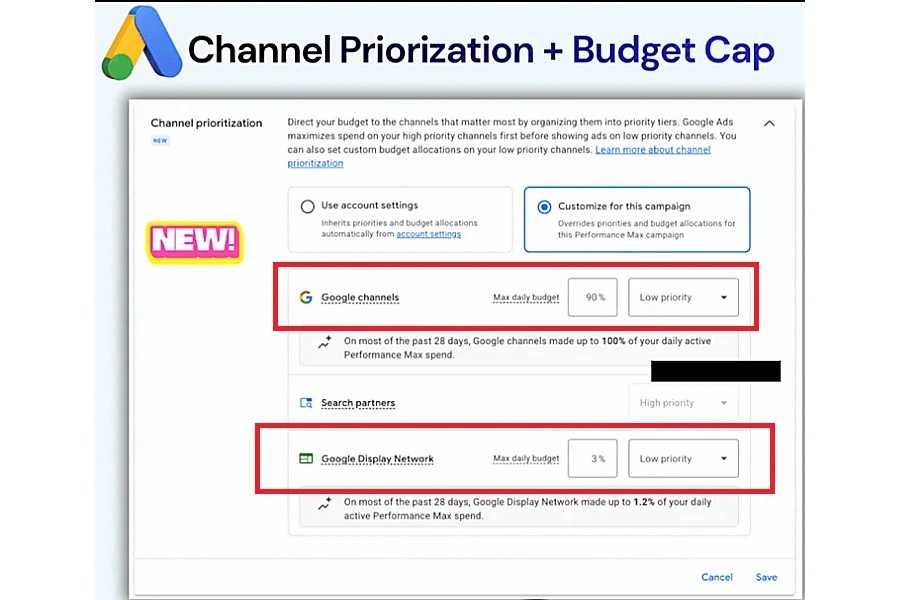
The rollout is progressive across Search, Shopping, Performance Max, and Demand Gen campaigns. Advertisers may not yet see the controls in their Google Ads accounts, availability may vary by account and campaign type.
Prioritize Channels Based on Campaign Goals
Previously, advertisers who wanted to limit spending on certain networks often had to choose between keeping a channel enabled or opting out of it. The new controls introduce another option as Google rolls them out to eligible accounts.
Advertisers can assign available channels or channel groups one of two priority levels:
- High priority: Google prioritizes spending on these channels first, subject to the campaign's bidding strategy and performance targets.
- Low priority: Google considers these channels after high-priority channels, subject to the campaign's bidding strategy and any applicable budget allocation settings.
For example, an advertiser running a Search campaign might want Google Search to have priority because it brings in qualified leads. Search partners might be given priority allowing the advertiser to keep testing that traffic without treating it as equally important.
However low-priority channels won't always get money in every situation. The result depends on the campaign's budget, bidding strategy, available traffic, and performance targets.
Set Budget Allocation Limits for Low-Priority Channels
Alongside channel prioritization, Google is rolling out percentage-based budget allocation controls for eligible low-priority channels.
Imagine a campaign has an average daily budget of $1,000 If an advertiser sets a 5% allocation for a low-priority channel Google will try to keep spending on that channel at or below $50 per day.
The percentage is based on the campaigns daily budget not on how much is actually spent each day. Google says the allocation is a best-effort limit, which means spending can sometimes go over the chosen percentage.
Want to optimize your Google Ads budget?
Chat on WhatsApp +91 94423 64284
This difference is important for advertisers who want to control costs while keeping channels running. The setting offers another way to manage how much each channel is exposed to. Campaign results and real spending still need to be watched closely.
What Campaign Types Are Included in the Rollout?
Google is progressively introducing the controls across several campaign types. The available channel groupings depend on the campaign type and the settings supported.
Campaign type | Available channel groupings |
Search | Google Search, Search partners, Google Display Network |
Shopping | Google Search, Search partners |
Performance Max | Google channels, Search partners, Google Display Network |
Demand Gen | Google channels, Google Display Network |
For Performance Max and Demand Gen, Google uses the grouping Google channels for its own properties, including Search, YouTube, Maps, Gmail, and Discover.
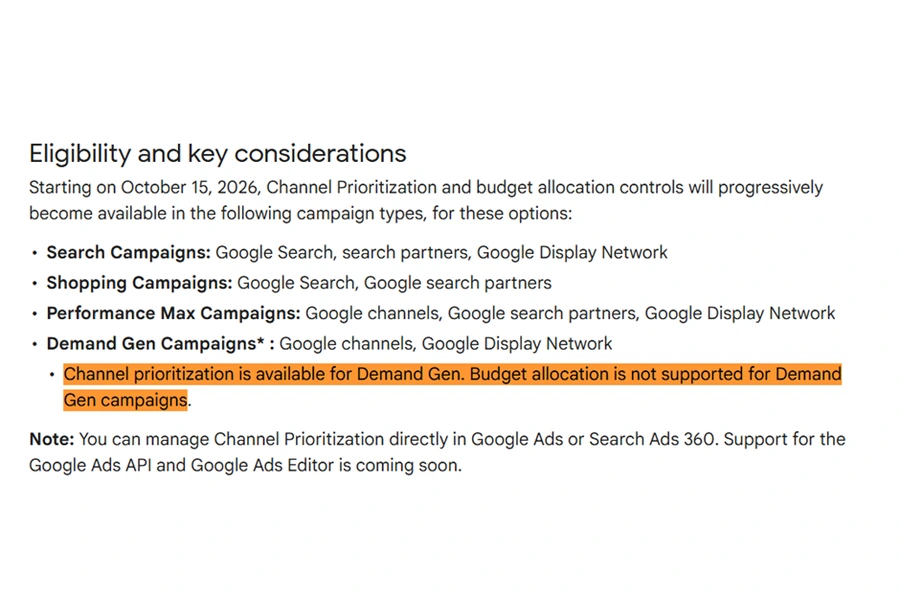
There is an important limitation - Demand Gen supports channel prioritization, but channel-level budget allocation is not supported for Demand Gen campaigns. Advertisers should check the options available for their specific campaign type before planning budget changes.
Where to Find the New Controls in Google Ad Account
Google is rolling out the settings for account-level, shared-budget, and campaign-level configuration, subject to the applicable requirements. The controls may not appear in every account while the rollout continues.
At the account level, advertisers can set default priorities for eligible campaign types. Individual campaigns can use those defaults or override them with campaign-level settings. Shared-budget settings apply to campaigns using that shared budget, subject to Google's requirements.
Once the feature is available in an account that's eligible advertisers can check the settings by following these steps
- Sign in to Google Ads.
- Open Account settings and look for the Channel Prioritization section.
- Select the eligible campaign type and set High or Low priority for the available channels.
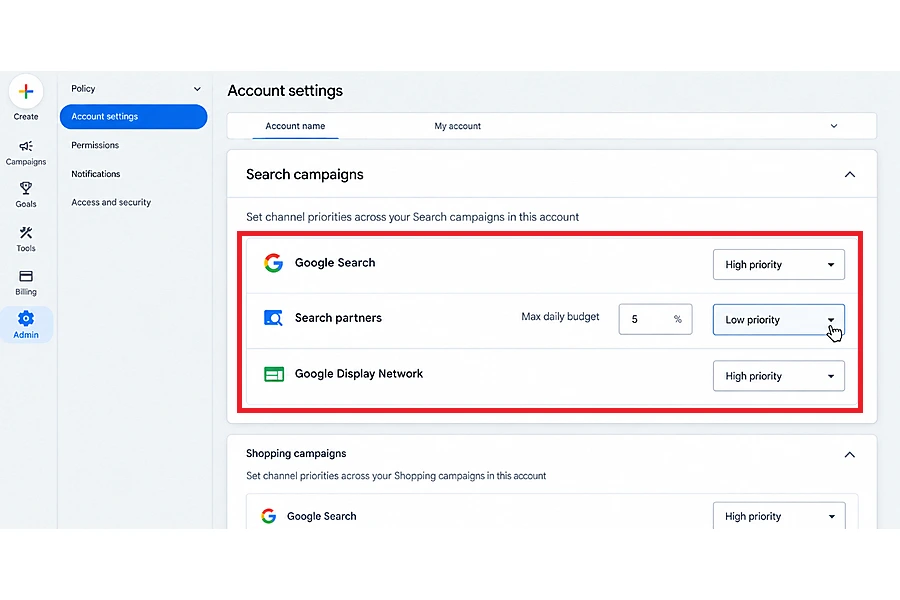
4. For eligible low-priority channels, enter a budget allocation percentage if needed.
5. Save the settings and keep an eye on campaign performance.
For changes to a campaign open the campaign and check its settings for Channel Prioritization.
If the option isn't there it might not have reached the account yet. It might not be supported for the campaign being checked. Google also states that channel prioritization cannot be configured directly from a manager account; advertisers must use the client account or an eligible campaign.
Why Channel Prioritization and Budget Allocation Are Useful for Google Ads Advertisers
These Channel Prioritization and Budget Allocation update give Google Ads advertisers control when it comes to managing campaign channels and budgets. Advertisers can set which channels are most important and assign part of the budget to channels that are not as high priority. This helps them manage how money is spent across channels.
By looking at conversion quality cost per lead, conversion value and return on ad spend (ROAS) advertisers can choose which channels should get attention and where budget limits might be helpful. This allows them to focus on business results instead of just the number of clicks.
The advantage varies depending on the type of campaign the way bids are. The budget rules in place. When channel prioritization and budget allocation are used together advertisers can make choices, about how to spend money and make sure their campaigns match their advertising goals.