If you are a PPC agency managing Google Ads accounts, business name requirements are probably something you have already come across during account setup, advertiser verification or asset reviews. Google has now updated its Business Name requirements as part of its October 2026 editorial policy update.
I found this update interesting because the business name shown in an ad may seem like a detail but it can affect whether a business information asset gets approved. For agencies managing client accounts this is something worth checking carefully.
Google’s New Business Name Policy
Googles October 2026 editorial policy update allows some differences between the business name and the destination domain in situations.
The business name still needs to represent the advertiser’s recognized brand. There also needs to be a verified direct relationship between the advertiser and the domain owner and the products or services advertised must be directly offered on that destination domain.
This does not mean advertisers can simply choose any brand name they want.
Google specifically says that third-party resellers, independent booking intermediaries, affiliate distributors and secondary sellers do not qualify for this provision when using the standalone brand name of the goods or services they offer.
For me, this is the part PPC agencies should pay attention to. The update gives some businesses more flexibility, but it does not remove the need for the business name to genuinely represent the advertiser.
Business Name Requirements Before and After the Update
Before this update, Google was stricter about how the business name used in an ad matched the advertiser’s verified information and destination domain. If the business name and domain did not clearly match it could create issues with the business name asset.
With the October 2026 update Google now allows some differences between the business name and destination domain in situations. The advertiser still needs to have a verified relationship with the domain. Must directly offer the advertised products or services through that domain.
For me this is a distinction. The update does not mean advertisers can use any brand name they want. The business name still needs to represent the actual advertiser, and Google’s other requirements still apply.
For example, if a company owns a domain but operates a recognized brand under a different name, that brand may now be eligible in certain cases. However, a third-party reseller or affiliate cannot simply use the brand name of another company and expect the update to apply.
As a PPC agency, I would therefore check the business name, domain, advertiser verification and landing page together before changing anything in a client's Google Ads account.
Why the Business Name Matters in Google Ads
When I audit a Google Ads account, I don't look only at keywords, bids and conversions. I also look at how the business is represented in the ad.
Google's Business Information assets can show a business name and business logo alongside eligible ads. These assets are created to help businesses connect with customers by using their brand identity.
Google still has requirements around the business name. For example, a florist should use the florist’s business name or brand name of adding location or promotional words. A florist called "Bloom & Petals" should not use names like "Best Florist in Sydney" or "Bloom & Petals Flower Sale" as the business name, in Google Ads. The business name should represent the business not act as extra ad copy.
So, I would not treat the business name field as another place to add keywords.
The Business Name Still Needs to Match
Google's current Business Information guidance says the business name should match either the domain name or the legal name verified through Advertiser Verification, with certain options available through brand verification. The business name also has a 25-character maximum.
For example, if a company has a verified domain called submitinme.com, using a business name that clearly represents that company is generally straightforward.
The situation becomes more complicated when the brand name, legal business name and domain name are different.
This is where I think agencies need to slow down and check the account instead of simply changing the business name until Google approves it.
Brand Verification for Business Names in Google Ads
Google also provides Brand Verification for certain situations.
If a business owns a trademark for a name or logo that is different from its verified legal or domain name it can apply for brand verification. Google explains that this can be useful when the business has a trademarked trading name, shortened name, sub-brand or different business names for lines of business.
I think this is especially useful for agencies working with established businesses that have brands or operate under a trading name.
The important point is that the business needs to have the appropriate rights and verification in place. It is not simply a way to choose a more attractive business name for an ad.
What PPC Agencies Should Check
If I were reviewing client accounts after this update, I would start with the Business Name assets.
I would check whether the business name used in the account matches the client’s verified information and whether it is clearly represented on the landing page.
I would also check the domain and legal business name used during advertiser verification. If the client is using a brand name I would check whether there is a legitimate reason for the difference and whether brand verification may apply.
Next, I would look at the landing page. Google says the advertiser’s business name needs to be clearly present on the landing page for business information assets.
I would also check whether the same business is using names across multiple campaigns or accounts. Google recommends using a business name and logo for a given domain across campaigns and accounts.
Business Name Requirements in PPC Audits
For me this update is another reminder that a PPC audit's not only, about campaign performance.
When I review a Google Ads account, I want to know whether the account is technically and policy-wise healthy as well.
Looking for Free PPC Audit?
Chat on WhatsApp +91 94423 64284
I would now add business name checks to my audit process where relevant. I would look at the business name, domain, advertiser verification, landing page and business information assets.
This is especially important for agencies managing many client accounts because a small policy issue can easily be missed when the focus is mainly on spend, conversions and ROAS.
How to Verify the Business Name in Google Ads
If I am checking a client account I would not just look at the business name. Assume it is correct. I would check every part inside Google Ads carefully.
1. Check the verified business name
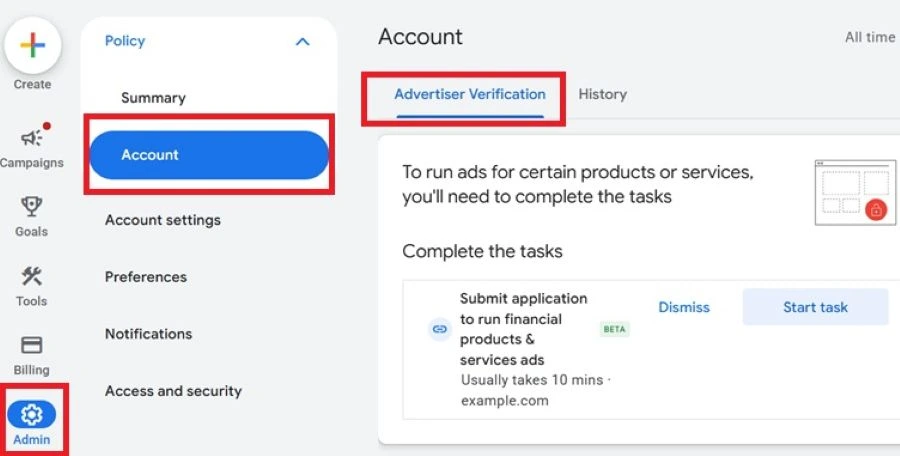
Go to Google Ads, open Admin, select Policy, choose Account, and then open Advertiser Verification. And look at the advertiser verification information. Google shows the verified name on the Account page. This is the name I would compare with the business name being used in the ad.
2. Check the business name asset
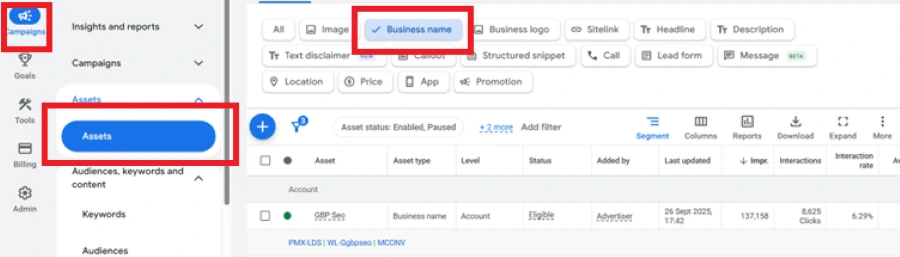 Go to Campaigns. Then click on Assets and look for the Business name asset. Check whether the name matches the verified legal name or the registered domain. Google allows a maximum of 25 characters for the business name.
3. Check the domain
Open the clients website. Compare the domain with the business name used in Google Ads. If the business name does not match the domain or the legal name check if the business has a reason for using a brand name and check if Brand Verification might be needed.
4. Check the landing page
Open the landing page used by the campaign. The business name should be clearly visible, on the page. I would not rely only on the Google Ads account settings because Google also checks whether the business name is clearly represented on the landing page.
5. Check Brand Verification
If the client wants to use a trademarked business name that does not match the verified legal or domain name, check whether Brand Verification is available. Google says the business name asset should first be created and disapproved for being irrelevant. From the disapproved asset, select Fix and Verify, then provide the trademark registration number and country of registration.
6. Check the wording
Make sure the business name is not being used as ad copy. Avoid adding keywords, locations, offers or any promotional language to the business name. Google specifically lists location-based names and promotional language as examples of names that are not allowed.
7. Check the business name and logo together
Finally, I would review the Business name and Business logo assets together. Check if the same business identity is being used consistently across the campaigns and accounts. Google suggests using one business name and one logo for a domain across campaigns and accounts.
Final Thoughts
For digital marketing agencies, this editorial policy update is a good reminder to check the business name before running an ad. Using a name that does not meet Google’s requirements can lead to the business name asset being disapproved, so it is better to review it before the campaign goes live.