If you are an SEO agency managing client websites and need to check a website’s on-page SEO for free, H2fi’s Free SEO Checker can be a useful tool.
When I do an on-page SEO analysis, I do not want to use ten different tools just to understand what needs to be fixed. I want to quickly see what is working well, what needs attention, and which issues should be fixed first.
H2fi’s Free on page SEO analysis tool brings content optimization, on-page SEO, technical SEO, common SEO issues, and page speed together in one report. It also shows the Overall Score, Critical Issues, and Recommended Actions, so I can easily understand the page’s SEO condition.
What I like most about this on page SEO analyser is that the report does not only give me a score. It breaks the audit into different sections and shows the details behind the results, making it easier to find and fix SEO issues.
On page SEO Analysis Summary
After enter the website URL into H2fi’s Free on page SEO Checker, the tool takes a little time to analyse the page and then shows an SEO Analysis Summary.
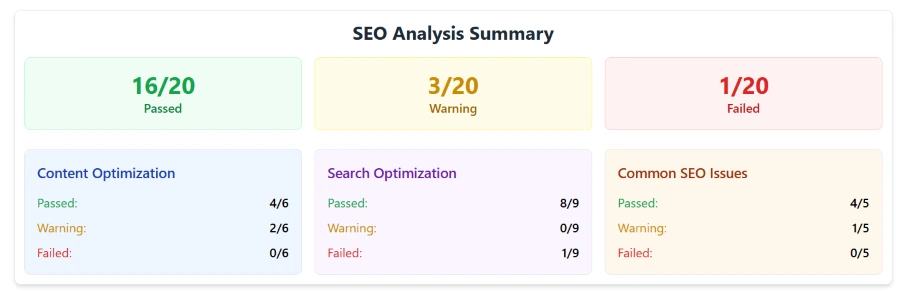
The summary starts with Passed, Warning, and Failed signals, so I can quickly see the page’s overall SEO condition. It also shows the scores for Content Optimization, Search Optimization, and Common SEO Issues.
I like to use this snapshot as a quick on-page SEO analysis before diving into the individual checks. I find it helps to start the on page analysis by knowing what areas are doing well and what sections may need some more attention.
Content Optimization: Is the page actually prepared for search?
The H2fi On-Page SEO report starts with Content Optimization. This is one of the sections I pay the attention to because content optimization means making a webpage clear, useful and easy for both users and search engines to understand. H2fi’s Free On-Page SEO Audit checks elements such as the meta title, meta description, Open Graph details, headings, content length, keyword usage and image ALT text.
I find these checks useful because they show whether the main content and page elements are properly optimized. When these elements are clear and relevant users can understand the page easily and search engines can better understand what the page is about. For me these checks are useful when I check on page optimization because even good content needs the structure and supporting elements to perform well in search.
Meta Title Check
The title is important because it gives both search engines and users a quick idea of what the page is about. A clear and relevant title can also make the page more attractive in search results.
IIn H2fi’s Free SEO Checker the tool checks whether the page has a title whether it is within the recommended title length of 50–60 characters and whether the title is actually present on the page. For me, this is a simple but important on page check because the meta title is one of the first elements I review when auditing a page.
Meta Description Check
The meta description is important because it gives users a short idea of what they can expect from the page when it appears in search results. A clear description can also make the search result more useful and relevant.
Free SEO Checker, whether the page contains a meta description and whether it is within the recommended around 150–160 characters. If the page does not have a meta description, the tool shows it as missing meta description and highlights it as an issue that needs attention. For me, this is a useful check because a missing or poorly written description can make the search result less clear to users.
Open Graph Check
The Open Graph check is important because it controls how a webpage can appear when it is shared on social media and other platforms. A properly set OG tag can make the shared link look clear and professional instead of showing incomplete or unrelated information.
Free SEO Analyzer, whether the page contains important Open Graph tags such as og title, og description, og image, og URL, and og type.
Sticking with the suggested title and description lengths will guaranty the information displays properly in social previews. I recommend keeping the OG title to around 50-60 characters and the OG description to around 150-160 characters. For the OG image, 1200 × 630 pixels is a commonly recommended size for social sharing.
For me, this is a useful check because the webpage may look fine on the site, but without the right OG information, the social preview may not appear as expected.
Google Preview
The Google Preview is important because it helps me see how the page’s search result information may look to users before they visit the website. This makes it easier to review the presentation of the page title and description together.
On page SEO report shows a clear preview of the meta title and meta description as they may appear in Google search results. I can easily see how the content is being presented and if the title and description look clear and relevant. This is handy for me as it gives a visual representation rather than having to check the html code to see how the search result might look.
Social Share Preview
Why Social Share Preview is Important? When someone shares your webpage link on social media, it shows what your page can look like. Good preview makes the shared content looks clear and professional and helps users to understand what the link is about.
With H2fi’s Free SEO tool, can preview how a social share will look with the logo/image, title, description, and URL on Facebook, X, and Instagram. This is a good check for me as I can see the full social preview in one place and make sure the page has the right information for sharing.
H1 Check
The H1 is important because it tells users and search engines what the main theme of the webpage is. A clear H1 also helps give the page a proper content structure.
H2fi’s Free SEO Checker checks whether the H1 is present on the page and whether it is within the recommended length of 20–70 characters. If the H1 is missing or does not meet the recommended limit the tool highlights it in the audit. For me this is a SEO, on page test because the H1 should clearly represent the main subject of the page and support the rest of the content.
Heading Structure Check: H1 to H6
The heading structure is important because it helps to organize the content and makes the page easier to understand for both users and search engines. A clear structure also makes longer pages easier to read and scan.
On page SEO checker shows the page’s H1, H2, H3, H4, H5 and H6 structure so I can quickly see how the headings are arranged. If any heading level is missing repeated unnecessarily or used in the order H2fi’s Free SEO Checker highlights the issue in the audit. For me this is a check because a proper heading structure gives the page a clear flow and helps organize the content logically.
Content Length Check
Content length is important because a page should have enough useful content to properly explain its topic. The right length can vary depending on the type of page, so I do not treat more words as automatically better SEO.
On page SEO analysis tool checks the total content length of the page and shows whether it falls within the recommended limit. If the content is too short or does not meet the range H2fi’s Free SEO Checker highlights it in the audit. For me this is useful because it gives an idea of whether the page has enough content to cover its main topic properly
Search Optimization: Can search engines properly understand and access the page?
The next part of the audit focuses more on search‑related signals. This is where my on-page analysis SEO goes beyond the content and looks at the settings that affect how search engines handle the page.
Canonical Tag Check
The canonical tag is important because it tells search engines which URL should be treated as the version of a page when similar or duplicate URLs exist. This helps avoid confusion about which page should be considered the version.
H2fi’s Free SEO Checker checks whether the canonical tag is present, on the page and shows the URL found on the page. This makes it easier for me to review whether the correct URL has been specified. For me this is a check because a missing or incorrect canonical tag can create problems when a website has similar versions of a page.
URL Redirect Check
The URL redirect check is important because redirects can affect how users and search engines reach the page. Many redirects or an incorrect redirect can make the page slower to access and create issues.
On page SEO analyzer checks whether the URL has any redirects and shows the redirect details when they are present. If there are no redirects the tool clearly shows "This URL doesn't have any redirects." For me this is a check because I can quickly confirm whether the URL is going directly to the intended page or passing through another URL first.
Sitemap Check
The sitemap is important because it helps search engines discover the important URLs on a website. It is also a useful part of the website’s technical SEO setup.
Free SEO Checker checks the website’s XML sitemap and shows whether it is available and working correctly. When the sitemap is available, the tool shows “Sitemap found and parsed successfully” along with the Sitemap Contents. For me, this makes it easy to confirm that the sitemap is present and that the tool can properly read its URLs.
WWW and Non-WWW Check
The WWW and non‑WWW check is important because a website can have two versions of the domain, such as www.example.com and example.com. Both should resolve to the preferred URL to avoid confusion and keep the website consistent.
H2fi’s Free SEO Checker checks both versions of the website. Shows whether they resolve to the same URL. For example it can show that http://www.gbpseo.in and http://gbpseo.in resolve to the URL. For me this is a check because it quickly confirms that both versions of the domain are handled correctly.
HTTP to HTTPS Check
The HTTP to HTTPS check is important because HTTPS provides a connection between the website and its visitors. It also helps make sure users are sent to the version of the website instead of staying on an unsecured HTTP version.
H2fi’s On-Page SEO Audit Tool checks whether the website correctly redirects from HTTP to HTTPS. When it is set up properly, the tool shows “Your website successfully redirects to the HTTPS (SSL secure).”
For me, this is a useful technical check because it quickly confirms that the website is using the secure HTTPS version correctly.
Robots.txt Check
The robots.txt file is important because it tells search engine crawlers which parts of a website they are allowed to access and which parts they should not crawl.
On-Page SEO Analyzer shows the robots.txt content and clearly displays the Allow and Disallow rules set for different areas of the website. It also shows the HTTP status and whether bots are allowed to access the site. For me this is useful because I can quickly review the crawling rules and make sure important pages or sections are not being blocked accidentally.
Noindex Tag Check
The noindex tag is important because it tells search engines not to include a page, in their search index. If this tag is added by mistake a well‑optimized page may not appear in Google search results.
SEO Checker checks whether the page contains a noindex meta tag. If there is no noindex tag the tool shows "No noindex meta tags found on the page." If a noindex tag is present the tool displays the noindex tag found on the page making it easier to review and fix when needed. For me, this is an important check because it quickly confirms whether the page has any instruction that could prevent it from being indexed.
Nofollow Tag Check
The nofollow check is important because nofollow tells search engines not to follow certain links on a webpage. It is useful when a site wants to control how particular links are treated.
SEO Analysis Tool checks the page for nofollow links and shows the number of nofollow links found. And provide the nofollow links in detail, so I can review which links have the attribute. For me, this makes it easier to identify and review nofollow links without checking the page source manually.
X-Robots-Tag Check
The X-Robots-Tag is important because it can give search engines instructions through the HTTP response header about how a page should be crawled or indexed.
H2fi’s Website Audit Tool checks whether an X-Robots-Tag header is present on the page. When no such header is found, the tool shows “No X-Robots-Tag header found. The page is crawlable by search engines.” If a header is present, the tool shows the X-Robots-Tag information so I can review the instructions. For me, this is useful because it helps identify technical SEO instructions that are not visible directly on the webpage.
Common On Page SEO Issues
The Common SEO Issues section looks for problems that can easily be missed during a normal content review.
H2fi identifies items such as deprecated HTML, SEO-friendly URLs, image ALT attributes, and keyword density, making this section useful as an on page optimization checker.
Need Help with SEO Optimization?
Chat on WhatsApp +91 94423 64284
Deprecated HTML Tag Check
Deprecated HTML Tags There are HTML elements you should avoid using on modern websites. Examples include <font> <center> <marquee> <strike> and <big>. Checking for them is important because old code can affect how a webpage is maintained and displayed in browsers.
On page SEO Analysis Tool looks at the page for deprecated HTML tags. Shows them when they are found. If the page does not use any deprecated tags the audit shows that the check has passed. For me this is a check because it helps find older HTML code that may need to be cleaned up or replaced with modern HTML and CSS.
SEO-Friendly URL
The URL is important because it gives users and search engines an idea of what the page is about. A SEO-friendly URL is usually short, descriptive and easy to read. It can use words separated by hyphens, such as H2fi.com/on-page-seo-check instead of a URL with long numbers, random characters or unnecessary parameters.
H2fi’s Free SEO Checker checks whether the page URL is SEO-friendly. When the URLs meet the recommended format the tool shows that the URLs are SEO-friendly. If the tool finds an issue it highlights the URL so I can review it. For me this is a check because I can quickly identify URLs that may need improvement without checking each one manually.
Favicon Check
The favicon is the icon that represents a website in browser tabs, bookmarks and other places. It may seem like a detail but having the right favicon helps give the website a more complete and professional appearance. For better compatibility, a square favicon of 48×48 pixels or larger is generally recommended.
On page SEO Testing Tool checks the website’s favicon setup and provides recommendations when it can be improved. The report can show details such as standard icons, Apple touch icons, and sizes.
Image ALT Check
The image ALT text is important because it describes an image for search engines understand what the image represents. Good ALT text should describe the image naturally instead of being filled with keywords.
Free On Page SEO tool checks the images on the page and shows the number of images without ALT text. When an image does not have an ALT attribute the tool highlights it. Also provides a visual preview of the image making it easier for me to identify which image needs attention. For me this is useful because I can quickly see the missing ALT images.
Keyword Density
The keyword analysis is useful because it shows which words and phrases are used often on the page. This gives me a sense of the terms being used in the content and if any word or phrase is being overused.
On-Page SEO tool shows the total word count and the frequently used 1-word and 2-word phrases. It also gives the number and percentage for each phrase.It helps me to review the content and see where I might be over-using keywords without having to count words manually.
Page Speed Analysis: Check both desktop and mobile
SEO is not about content and technical settings. A page also needs to load and provide a good experience for visitors so I always include page speed when reviewing a website.
H2fi’s Free SEO tools provides Page Speed Insights for desktop and mobile with a performance score out of 100. It also shows a Speed Visualization report for each device, which helps me see how the page loads over time. The report includes metrics such as First Contentful Paint (FCP) in seconds Largest Contentful Paint (LCP) in seconds Total Blocking Time (TBT) in milliseconds Cumulative Layout Shift (CLS) and Speed Index in seconds.
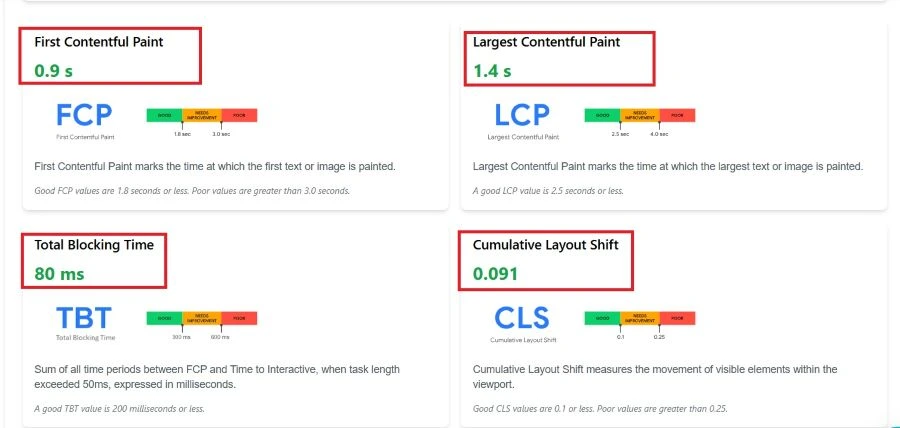
H2fi checks these results against the recommended limits. Shows whether the page is within those limits. For example, the recommended targets are FCP: 1.8 seconds or less LCP: 2.5 seconds or less and CLS: 0.1 or less. It also provides a chart of the recommended ranges making it easier for me to compare the page’s performance with these limits.
The report also includes Diagnostics to show areas that may affect page speed and provides a Passed Audits list for checks the page has already completed successfully.
For me this makes the page speed section useful because I can see the score, individual performance metrics, recommended limits, diagnostics and passed audits together without checking multiple reports.
Performance Summary and Recommendations
After checking all the sections I find the Score useful for getting a quick view of the page’s SEO performance. It gives me a snapshot of how well the page is optimized based on the different checks in the audit.
Free On-Page Audit Tool also highlights the Critical Issues. Gives Recommended Actions to help improve the page. The recommendations are divided into High Priority and Medium Priority which helps me to decide what needs to be done first.
For me, this makes the audit much more practical when learning how to check on page SEO, because I can see the overall score, understand the critical issues, and follow the recommended actions in the right order.
My Overall Take on the H2fi On Page SEO Analysis
When I use an SEO checker, I want to quickly see what is good and what needs improvement.
The H2fi SEO Analyzer makes this simple. It checks content, search optimization, common SEO issues and page speed in one report. I can also see the Overall Score, Critical Issues and Recommended Actions with High and Medium Priority.
I can also download the report as an image or PDF which's useful when I need to save or share the audit.
The biggest benefit for me is that it is a SEO tool, for checking website pages. I can use it to locate SEO problems and figure out what needs to be fixed.