You're a PPC agency and running Google Ads campaigns for your clients? If that's the case, you already understand what a Google Ads campaign is all about more than just clicks and conversions.
I work in a PPC audit company, and in this article, I am sharing what I check during a PPC audit based on my experience. I will walk through the important areas I check, from campaign setup, budget and bidding to keywords, search terms, landing pages, conversion tracking, audiences, and overall campaign performance. I will also cover how I look at lead-generation and e-commerce campaigns differently, identify wasted ad spend, and turn the audit findings into a practical action plan.
If you are auditing a client’s Google Ads account, you can use this guide as a simple checklist for your PPC account audit so you are not missing the important areas. If you are doing your first audit, even a free PPC account audit can help you identify obvious issues before deciding which areas need deeper analysis.
1. Start by Understanding the Business Goal
Before I start reviewing the campaigns, I learn about what the business wants to accomplish. The objective may be unique to each account. A local service business may want phone calls and form submissions. A B2B company may be looking for qualified leads. An e-commerce business may be focused on purchases and revenue. I also check what the client considers a valuable conversion.
For a lead-generation account, I do not treat every form submission as equally valuable. I want to know whether the leads are genuine, whether they are qualified, and whether they eventually become customers.
Instead of number of purchases, for e-commerce, I am looking at the revenue generated from the purchases. ROAS (Return on Ad Spend) plays a critical role in this scenario. I also make the determination of the audit period. I will review the last 30, 60 or 90 days and compare that to a time frame that would have been beneficial to compare.
2. Check the Google Ads Account Structure
I begin with the account structure because if you don't have a good account structure, it may be hard to optimize the campaign. If I am doing an audit of a PPC campaign, I check how the campaigns are separated and whether the structure is logical for the business. I go to the Campaigns section in Google Ads and select Campaigns to review how the campaigns are organized.
For instance, I look at how the campaigns are split by product, service, location, search intent, or different business objectives. I then select a campaign and open the Ad groups section to check how the keywords and ads are organized within each campaign.
I want the keywords in an ad group to be closely connected to the ads being displayed. If an ad group is too generic, the ads might not be as relevant to the user's search, which can affect the overall performance of the campaign.
A clean structure also allows me to better understand where the money is being spent and which areas of the account need attention.
3. Check Conversion Tracking
This is one of the most crucial components of a PPC audit. I review if key actions are correct. This is one of the most important factors to be taken into consideration for a PPC audit. I check that important actions are being properly logged – for example, form completes, phone calls, purchases, quotes requested, booking requests, sign-ups and other important actions for the business. I also search for duplicate conversions as I don't want the account to register the same action twice.
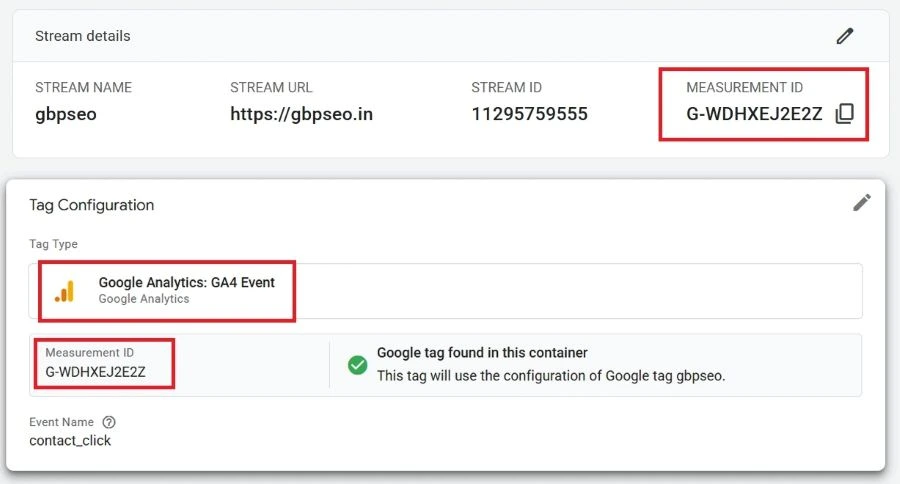
When tracking involves Google Tag Manager (GTM) and GA4, I check how everything is connected. For GTM, I check whether the tags, triggers, and variables are properly configured and whether the tags are firing as expected. I also look for duplicate tags or triggers that could cause duplicate conversions.
I also check whether the Google Ads Conversion ID and Conversion Label in the Google Ads conversion action match the values used in the Google Ads Conversion Tracking tag in GTM. In GA4, I verify the Measurement ID to make sure it is correct and matches the GA4 property connected to the website.
To find the GA4 Measurement ID, I go to Google Analytics, select the relevant property, open Admin, and go to Data collection and modification and then Data streams. I select the website data stream and check the Measurement ID shown in the Web stream details.
To check the GTM setup, I open Google Tag Manager and select the relevant container. I then go to Tags to review the GA4 and Google Ads tags and check their configuration, triggers, and tracking IDs. I also use the Preview option when I need to test whether the tags are firing correctly.
I also check the website itself to make sure the correct GTM container code and GA4 tracking code or Google tag are installed properly.
For GA4, I verify that important events are being captured correctly and that the appropriate events are marked as key events where required. I also check whether the events are being received properly. Finally, I compare GA4 data with Google Ads data to identify significant differences in tracking.
Finally, I test the conversion journey myself to make sure the tracking works correctly from the website through GTM to GA4 or Google Ads. This helps me identify missing tags, incorrect IDs, duplicate tracking, or conversions that are not being recorded properly.
4. Review Campaign Settings
First, I look at the campaign settings because small settings can make a significant difference in how the budget is used. In Google Ads, I go to Campaigns, select the campaign I am auditing, and open Settings. This is where I review the main campaign settings, including location, language, networks, ad schedule, devices, budget, bidding, conversions, and audiences.
Location Targeting: When the business requires it, I also review the location options to ensure that the ads are appearing to those who are in the target location. I exclude locations that don't affect the business so as not to spend the money.
Language Targeting: I check to see if the target languages are suitable for the target audience. I ensure that campaign settings are aligned with the audience targeting a particular language if the business is targeting a particular language speaking audience.
Networks: View what networks are enabled in the campaign. If the campaign goal is something I can achieve in the Display Network settings, I review them to see if that option is appropriate. I also monitor the performance from these networks to ensure that the budget is not being used to traffic that isn't beneficial.
Ad Schedule: I will look for when ads are being played and compare day and time performance. If specific hours’ drive clicks, but not much conversions, I'd say it's time to change the schedule or cut down on unnecessary spend during that time.
Devices: I check on my mobile, desktop and tablet to track progress in each medium. When one device is performing better than another, I consider things like conversion rate and cost per conversion, as well as other performance factors, before making bid or budget changes.
Budget: I ensure that the daily budget is used correctly. I'm searching for campaigns that are overspending but not getting the desired results and campaigns that could require additional spend due to revenue producing campaigns.
Bid Strategy: For instance, a lead generation campaign can be optimized for conversions and an e-commerce campaign can be optimized for conversion value and ROAS (return on ad spend). I also monitor if there is sufficient conversion data that are available for the picked strategy to be effective.
Conversion Settings: I check whether the correct conversion actions are included in the campaign. I also make sure important conversions are being counted properly and that unnecessary or duplicate conversion actions are not influencing campaign optimization.
Audience Settings: I review the audiences being utilized in the campaign and if they are pertinent to the business or not. I also monitor audience targeting, observation settings and audience performance so I can be sure which audience is engaging with the ads and converting.
I am specifically interested in location targeting for location-based businesses. I want to make sure the ads are reaching the locations the business actually serves.
I also look at performance by device and time of day. If a campaign is spending heavily during periods that generate clicks but very few useful actions, that deserves a closer look.
I do not automatically change every setting I find. Before making a recommendation to change, I will first examine the data and the business goal.
Need help with your Free PPC audit?
Chat on WhatsApp +91 94423 64284
5. Audit the Keywords and Search Terms
One of the most important components of a PPC account audit is keywords. The first thing I do is determine if the keywords are still pertinent to the business and aligned with the actual purpose of the campaign.
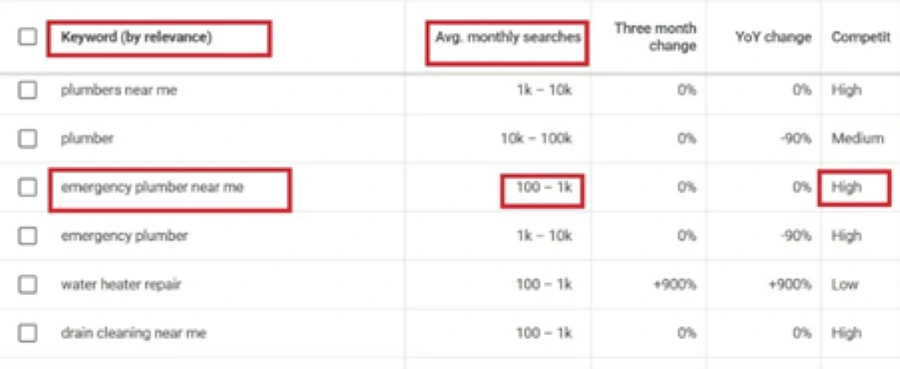
I use Google Keyword Planner to check if the keywords are relevant and find new keyword ideas. I review related keywords, search volume, and competition. This helps me find keywords that may be useful for the campaign.
I look at the various type of matches: Broad Match, Phrase Match and Exact Match. The broad match will perform more wide-ranging searches for the keyword. I am more in control with phrase match since it can target queries based on the intent of the keyword and what it means. I am more in control with exact match because it can target searches that are similar to the intent of the keyword and what it means. I review and determine if the selected match type is appropriate for the campaign and objectives.
I also check the Search Terms Report to find out what people are searching when they click on the ads. What may seem like a great match within the Google Ads account can actually be quite different on the actual searches. That's when I see chances for better campaign success.
I search on irrelevant terms, low intent queries, informational queries, job-related queries, free-service queries, unwanted locations, competitor queries, and product or service unrelated queries. I then review these terms to see which ones should be added as negative terms/subdomains to eliminate unwanted traffic
I also look for any keywords that are duplicate or overlap as they may be looking for similar searches. Lastly, I check the performance of my keywords by looking at how many people are clicking on the ads when they view my ads, CPC (Cost Per Click) to see how much I'm spending on each click, Conversion Rate to see how many people are converting after seeing my ads, and CPA (Cost Per Acquisition) to see how much it costs me to get them to convert. I also refer to Quality Score, a Google Ads diagnostic score that helps me understand the relevance of the keyword, ad and landing page.
6. Review the Ads and Ad Copy
I check the ads after keywords. I go to Campaigns, select the campaign I am auditing, and then open the Ads section to review the ads running in that campaign. Verify that the ad messaging is relevant to the keywords used and it provides a clear description of what the business does. The value proposition should be easily comprehended and the ad should provide users with an obvious incentive to click on it.
With Responsive Search Ads (RSAs), I'll scan the headlines and descriptions before I click on them. Up to 15 headlines can be used on an RSA, for each headline use 30 characters, and up to 4 descriptions can be used on an RSA, for each description use 90 characters. I ensure that headlines and descriptions are on-topic, don't repeat myself unnecessarily, and convey the purpose, services, offers in an obvious way.
Another thing I do is look at performance of ads and see if there is any kind of pattern in CTR as well as conversions and conversion rate. Next, I audit the assets I have to ensure they align with the main ad message, are correctly linked and relevant.
I also want to make sure that the messages are consistent throughout the campaign. I do not want an ad that promises one thing, and then it's a different thing on the landing page. That just adds clutter to the customer journey.
7. Audit the Landing Pages
While a campaign can be well-optimized with relevant keywords and compelling ads, they will not be successful if the landing page is confusing, slow or irrelevant. I look to see if the landing page has relevance to the ad and keyword. The user should be brought to the same page that they saw in the ad with the same message.
I also do a speed check and mobile experience check. Users may not take any steps if the page fails to load quickly or if it doesn't function properly on their mobile devices. In addition to this, I check the relevance of the landing page, headings and content, where to put the Call-To-Action, form usability, contact information, trust signals, product or service information, navigation, and conversion experience overall. I want to ensure that the page is understandable, accessible and simple for the user to take the desired action.
If it's a lead gen campaign, I think very carefully about the form and the process for communicating with the contact. There is unnecessary friction if someone clicks an ad for "emergency plumbing services" and is directed to a generic site where they need to search for the service.
For e-commerce I go to the product page, pricing, product information, images, shipping, trust elements and the journey to the checkout.
8. Check Budget Allocation and Bidding
I go to Campaigns, select the campaign I am auditing, and open the Budget and Bidding settings. I analysis each campaign's budget and spending to its actual results. I look to see if successful campaigns are being underfunded and unsuccessful campaigns are getting too much money. I also look for campaigns that are under budget, that cost a lot of money and are low conversion, that don't spend enough money on campaigns that generate value, and spend a lot of money from less valuable searches.
Now, I'm going to look at the bidding strategy. If the account is using manual CPC, or automated bidding strategies like Maximize Conversions or Target CPA, I generally want to make sure the bidding strategy aligns with the goal of the campaign and that there is sufficient conversion data to support the bidding strategy.
Instead of maximizing clicks, for lead generation, I can work on conversions and cost per qualified lead. I could analyze the performance of the bidding strategy in achieving the business goal considering the conversion value and ROAS (Return on Ad Spend) for e-commerce.
9. Analyze Lead-Generation and E-commerce Performance Differently
Lead-generation and e-commerce campaigns need slightly different approaches because the final business goals are different.
For lead generation, I consider lead quality, conversions, cost of leads, phone calls, form fills, leads, total ad spend and conversions per ad spend. I also look at Search Impression Share to see how much the ads are being seen for eligible searches and CTR (Click-Through Rate) and CPC (Cost Per Click) to learn how users are interacting with the ads and how much they are paying for each click. I'll look at Primary Conversion Action to ensure the primary business target is being tracked properly and then I will look at Secondary Conversion Actions to gain insight into other valuable actions that might support the business goal from the customer journey.
The primary difference for ecommerce campaigns is that I'm not concerned with the quality of the leads, I am concerned with making sure that people are purchasing and that they are bringing in revenue. I use a variety of metrics to see how my ad spending is doing, including total ad spend, purchases, conversion value, revenue, ROAS (Return on Ad Spend), average order value, cost per purchase, and product-level performance. I also look at Primary Conversion Actions and Secondary Conversion Actions to ensure conversions are being tracked properly, and to find out what users are missing out on when they are not buying.
Product margins and average order value are also something that I consider when looking at an ecommerce campaign, as it could be profitable but not as profitable as the revenue. I want to see what is generating actual sales and if the advertising money is generating profit.
10. Review Negative Keywords
I go to Campaigns, select the campaign I am auditing, and open Keywords. From there, I select Search terms to review the actual searches that triggered the ads
In addition, I add a negative keyword check during the audit as these can be useful for reducing the waste of spend on unwanted keywords. I review the Search Terms Report and find out that there are some search terms that activated ads but not relevant to the business. Depending on the campaign, searches for "free" and "jobs" and names of competitors might attract the wrong kind of traffic.
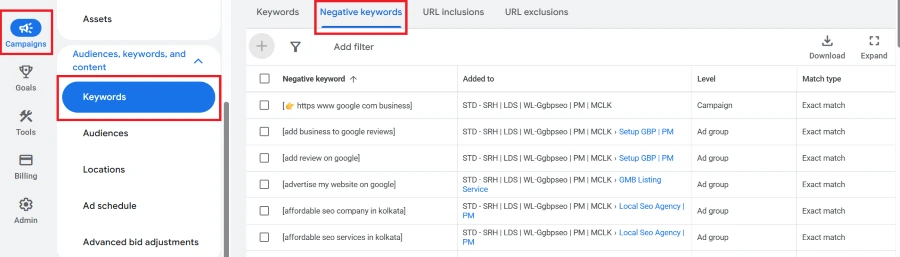
I then review if these unwanted searches should be included in the negative keyword list and if the negatives are added at the right campaign and/or ad-group level. I also review the negative keyword list to check relevancy and make sure no important searches are being filtered out unnecessarily.
This can be especially useful if your campaigns are receiving a lot of spammy traffic. Unwanted searches can be removed to ensure that the budget is spent on the audience and search intent the business is looking for.
11. Review Audience Targeting
I go to Campaigns, select the campaign I am auditing, and open Audiences. In addition, depending on the campaign type, I will check the audience strategy and the remarketing activity to see how audience is being targeted after they interact with the business.
.webp "Google Ads audience dashboard showing audience targeting, performance, and demographic data.")
When relevant to the campaign, I review remarketing occurrence that include Remarketing Lists for Search Ads (RLSA), Display remarketing, and YouTube remarketing.
For an e-commerce business, I may see different audiences such as product viewers, cart abandoners, previous purchasers, and returning visitors. These audiences can have completely different levels of intent. A person who viewed a product yesterday is not necessarily at the same stage as someone who purchased from the business six months ago.
So, I verify data points are correct – audiences are segmented appropriately by their actions and messaging and offers are tailored to those segments. This is to ensure that there is no duplication of messaging at different stages of the customer journey.
12. What Should Decide Whether a Campaign Is Performing Well?
A high CTR does not automatically mean the campaign is profitable.
A low CPC does not automatically mean the traffic is valuable.
A high conversion rate does not automatically mean the leads are qualified.
And a high-Quality Score does not automatically mean the campaign is achieving the business objective. So, what should actually decide whether a campaign is performing well? I look at the metrics together and connect them back to the actual business goal.
With lead generation campaigns, I'm more interested in the fact that I'm not only seeing a lot of conversions, but I am seeing a lot of qualified conversions and customers. For Ecommerce, I review purchases, revenue, ROAS and value attributed to the ad spend.
The campaign performs well if traffic and conversions are leading to the outcome that the business desires and spend is working in their favor. This enables me to see exactly where things are going well, where I'm spending unnecessary money, and what things need to get better.
13. Turn the Audit into an Action Plan
After completing the free google ads audit, I don't want the results to just sit in a report. I put them into a clear action plan. The results are divided into immediate action, performance improvement, and monitoring. For instance, issues, irrelevant search terms, wasted spend, or wrong campaign settings can be addressed immediately, but ad testing, landing page optimization, and bid adjustments can be optimized on an ongoing basis.
I also take into account the changes that will have a business objective and impact. This helps to determine which changes will be first, rather than attempting a series of changes at once.
Lastly, I record the problem I encountered, the changes I suggest to solve the problem and the metrics I will follow after the changes are applied. This clearly lets me know what the findings would be if it's going to be done with a PPC audit company.