A day ago, I was looking at an online store for a handbag. I liked a design checked the price read some customer reviews and then left the website without making a purchase.
That day as I was scrolling through Facebook and Instagram, I saw ads for similar handbags.
I am sure many people have had this experience. We look for a product visit a website and then start seeing ads on social media.
Behind these ads there is often something working quietly in the background the Meta Pixel.
Understanding what happens after someone clicks or sees an ad is not always clear. With privacy changes and limits on browser-based tracking advertisers have been searching for ways to understand what customers do.
Now Meta Ads is making another change to conversion tracking. It is bringing conversion measurement on customer devices to eligible Meta Pixel users.
Let’s look at what this means and why advertisers should be aware.
How Meta Is Updating Conversion Measurement
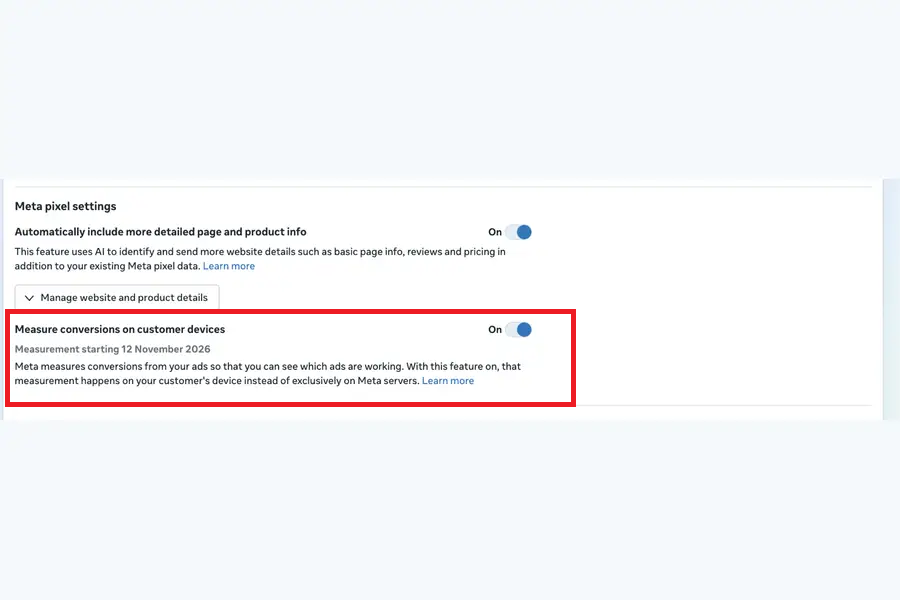
Meta is introducing a feature called Measuring Conversions on Customer Devices for Meta Pixels.
The idea is to help businesses track conversions directly on customers devices using information that customers have already shared with the business.
Traditionally advertisers have used tools like the Meta Pixel and Conversions API to understand what people do after interacting with their ads.
However, browser restrictions, privacy settings and other limitations can make it hard to capture every customer action.
This new way of measuring gives Meta another way to understand conversion activity.
According to the rollout details the feature is expected to be available starting November 12 2026 for advertisers.
How Does Conversion Measurement on Customer Devices Work?
Let’s take an example.
Imagine you own a clothing store. You run ads on Facebook and Instagram to promote a collection.
A customer sees your ad clicks it and visits your website. They look at some products add a dress to their cart and eventually make the purchase.
As an advertiser you want to know if that purchase came from your ad.
This is where conversion tracking becomes important.
With customer-device tracking Meta can use information that the customer has already shared to match an ad interaction with a conversion.
In terms it gives Meta another way to understand if an ad led to a customer action.
It works with existing tools of replacing the Meta Pixel or Conversions API.
Why Meta Is Changing Conversion Tracking
Think about how people use the internet today.
Some people use Chrome others use Safari. Many visit websites through mobile apps. Their privacy settings and tracking preferences can also be different.
As a result, advertisers may not always get a picture of what happens after someone interacts with an ad.
For businesses this creates a tracking challenge.
Imagine spending $500 on a Facebook ad campaign and getting purchases. If some conversions are not tracked properly the Ads Manager report may not show the picture.
This can make it harder to understand how well the campaign is doing.
Metas new tracking method is meant to help with some of these tracking issues.
What Should Advertisers Know About This Update?
There are a few important things advertisers should understand before the rollout.
1. It works with eligible Meta Pixels
The feature is for eligible Meta Pixel setups. Advertisers should check their Events Manager to see if their Pixel is included.
2. It works alongside existing measurement tools
This does not replace Meta Pixel or Conversions API. Businesses should keep their tracking setup.
3. It may affect reported conversions
When Meta has ways to measure conversions the numbers in Ads Manager may change.
However reported conversions do not always mean more actual sales.
4. Check the Events Manager notification
Advertisers should check their Events Manager for details about eligibility, when it's available and how to set it up.
What Should Advertisers Do Before November 12?
I suggest that advertisers take some time to review their tracking setup of waiting until the feature is available.
Here are a few things worth checking:
- Open Meta Events Manager and look at your Pixel setup.
- Check if Meta has shown a message about customer-device conversion tracking.
- Review your browser Pixel and Conversions API setup.
- Make sure your purchase, lead and other key events are set up correctly.
- Compare reported conversions to sales or qualified leads.
- Keep an eye on changes in reports after the feature is available.
What Does This Mean for Digital Marketing Agencies?
For agencies that manage accounts this update is important to talk about with clients.
Imagine running campaigns for five online stores. Each store has products, audiences, budgets and goals.
If conversion tracking changes agencies need to understand how that affects the reports they give to clients.
It is important to explain the difference between business results and conversions shown by the ad platform.
For example, an increase, in sales should always be compared with actual sales data before making decisions about budgets.
This is also a time for agencies to check their Meta Pixel and Conversions API setups.
Looking to improve your Meta Ads performance? Get Meta Pixel setup services to track website actions, measure conversions, and understand how visitors interact with your ads.
Chat on WhatsApp +91 94423 64284